Posts

Showing posts with the label canvas

what I learned from 10 Javascript Projects from Florin Pop
Image
When you start to study Front-end development, you will learn HTML, CSS, Javascript and then the other frame for easy building such as React, Angular, VUE.  The Javascript knowledge is the basis for a front-end developer. Even when you connect with React for front-end or Node.js for back-end. So I am trying to practice Javascript with small projects to improve my skills. Actually, it's never outdated for these years, the basic knowledge contains in the projects usually. I choose the 10 Javascript projects in 10 hours of Florin Pop, and I can not believe I really spent a whole day doing it. For viewers who would like to get more details. here is his Github  code. And I also will show the code below for easy checking. 1.countdown timer See the Pen countdown timer by Yifang Di ( @diyifang ) on CodePen . 2.Quiz App See the Pen Quiz App by Yifang Di ( @diyifang ) on CodePen . 3. recipe app See the Pen Recipe App by Yifang Di ( @diyifang ) on CodePen . 4....

Breakout Game with Javascript

Image
  course from Brad Traversy Github code Features: canvas drawing  keydown and keyup requestAnimationFrame() HTML rules section hide at the left side with rules button and close button to control canvas is a game container with all the drawing CSS set the canvas to display block side rules lay at the left side and transform with x-axis when adding the class name show JS select elements DOM needed canvas context with canvas.getContext('2d') init the current score and drawing brick row and column counts init the data of ball, paddle, and bricks position x,y,size,moving speed. dx is the position of x-direction. dy is the y-direction First, drawing all the shapes on the canvas. ball, paddle, score, and bricks every time clear the context first with canvas width and height drawBall() with ctx.arc(x,y,radius,start angle,end angle)  More about canvasrenderingcontext2d.arc() MDN ctx .arc( x , y , radius , startAngle , endAngle [, anticlockwise ]); drawPaddle() with rect() more ab...

pong game with Javascript

Image
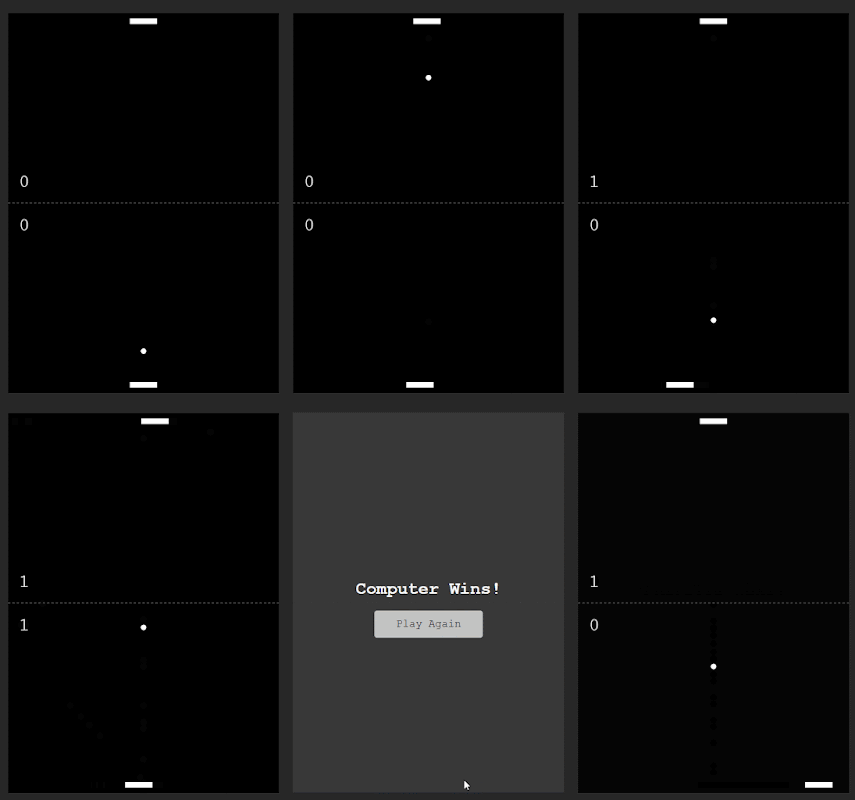
  Features: canvas rendering context,draw shape win score with if(),then can start again CODE Github  DEMO JAVASCRIPT reset all the variables and the ball in the center Then createCanvas With the blank canvas, render stuff on it The canvas should be with two paddles,middle dashed line,a ball and score display / draw shape with canvas  onMDN the middle dashed line build with canvas setLineDash() begin to animate()-->ball move and calculate the boundaries,then stop the game. repeat animations smoothly with requestAnimationFrame() css tricks    and  requestAnimationFrame() MDN the axis of ball changes based on speed If ball hit the wall,the speed reduce. If the ball hit the paddle,speed add. and calculate the score If player move,then computer move. If the score reach the winScore, the first reached win.And show the winner create the new overcome canvas. And can start game again with button click.

sketch board with Javascript

Image
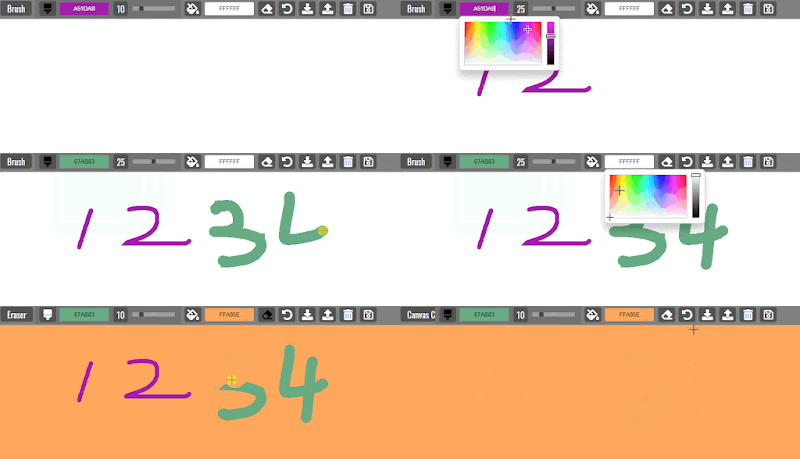
  Features: current status of active tool brush color and size,background color  erase and reset set , get and delete localStorage save the canvas image Code Github Demo HTML active tool is the status of current tool the brush color is based on jscolor  ,which can be custom the brush size is the slider from 1 to 50 bucket color is the background color of canvas eraser is the background color brush  clear canvas is to empty canvas manipulate the localStorage download the canvas to local if screen size is too small, the message show up link jscolor.js and script.js CSS custom the brush size slider color box styles. responsive screen message JAVASCRIPT select all the DOM Build canvas and init the variables click the brush icon to run switchToBrush function the icon turn black which means active and the values from html initially. And run displayBrushSize function Make the brush size two digital number .Add zero if single number when change brush color,current brush valu...