Posts

Showing posts with the label animations

Meet Typed.js — A JavaScript Typing Animation Library

Image
  Use this cool animation library for your next JavaScript project. Typed.js is a JavaScript animation library. Any string can type customer animated with content, speed, and so on. The most common use as I notice is for a landing page that looks modern in style. Official site: Typed.js Another demo made with love by Matt Boldt. # With NPM npm install typed.js # With Yarn yarn add typed.js # With Bower… mattboldt.com Step1: import js library with npm, yarn, bower, or CDN npm install typed.js yarn add typed.js bower install typed.js or <script src="https://cdn.jsdelivr.net/npm/typed.js@2.0.12"></script> Step2: HTML The content is included in the <div> The place content actually is typing is the <span> Step3: JS fire up the library with  new Typed('id',options) Customization: stringsElement: the content want to show typeSpeed: the speed of typing backDelay:backDelay time before backspacing in milliseconds fadeOut: fade out animation instead of ba...
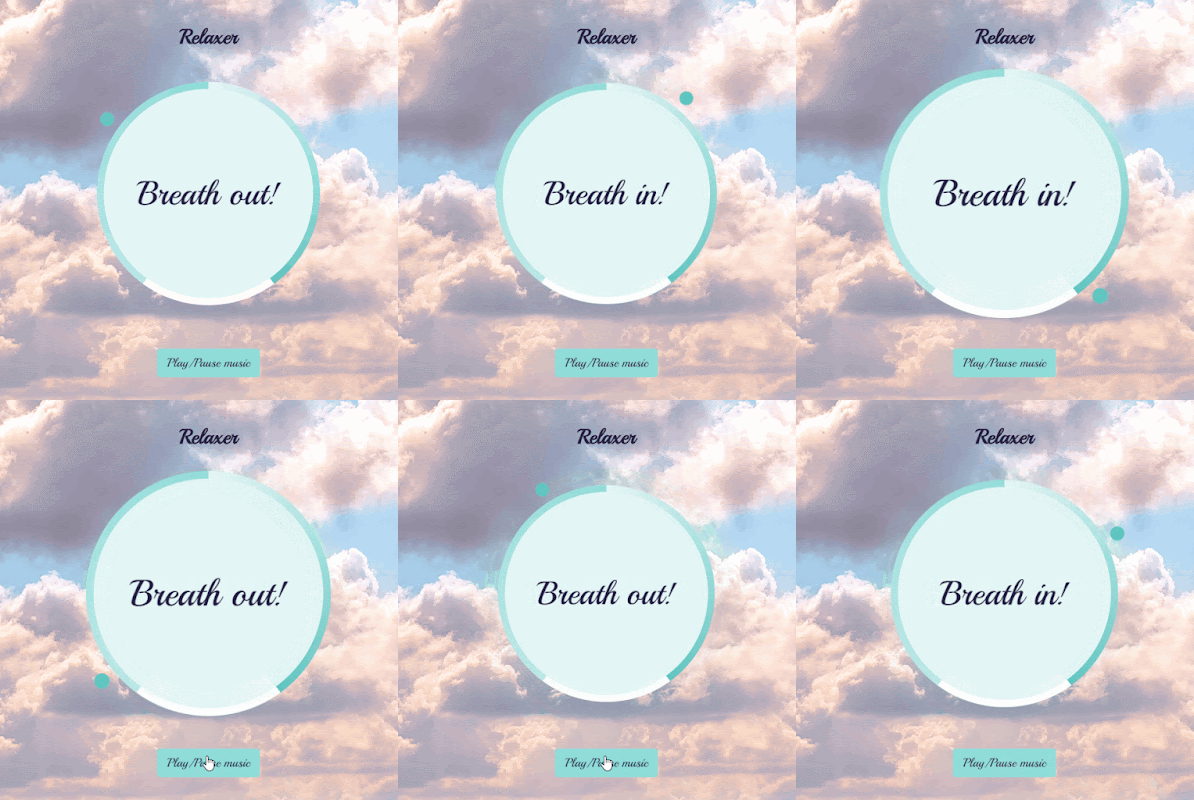
Relaxer APP with Javascript

Image
  course from Brad Traversy Github code Features: css animation setInterval setTimeout audio control HTML circle is a circle with solid color text is for reminder messages in the center pointer is the animated circle around the circle gradient circle is the three sections gradient background behind the circle layer audio with a control button CSS gradient circle is a conic gradient background and larger than the circle .  the z-index of circle is -1, soo the gradient cicle is -2 (under the circle) pointer is a small round outside of circle and gradient circle. the pointer container is like the clock, rotating around animation rotate infinitly rotate from 0 to 360 degrees When the class name contains grow, scale bigger when the class name contains shrink, scale smaller JS select all the element DOM init the totalTime,breathTime and holdTime when loading the page, the function breathAnimation runs. the text shows "breath in" and the circle scale larger with grow class name adde...

animated navigation with Javascript

Image
One page website with animated navigation with Javascript. Some similar navigation inspire: css flex split menu radial menu with TweenMax.js block menu with TweenMax.js sticky side menu with Javascript CODE REVIEW: HTML Menu-Bars is a hamburger navigation button. From W3C 5 sections total.  CSS Set the root color choices. title with some stylish. The overlay is the full screen navigation. JAVASCRIPT Select all the DOM elements. When nav active,toggle the nav class . First, burger button change when click. If overlay is not active, change animations. Click events happend. CODE Github See the Pen animated-navigation by Yifang Di ( @diyifang ) on CodePen .

animated scrolling template with AOS

Image
  AOS scrolling animated library template apply.  About the animated scrolling library has lots of options. I'll list some below: delighter.js ---CSS3 animation effects when scrolling scrollreveal.js ---animated elements when scroll page example page(fortnite gun gallary) Parallax with Javascript Laxxx.js ---a light weight Plugin to create animation when scrolling AOS animation demo smoove.js --Gorgeous CSS3 Scroll Effects jquery-scrolla.js ---a jQuery plugin for reveal animations when scrolling Download the landing template from tailwind  . There are 4 sample pages and 4 kinds of projects,such as html,angular,react and vueJS. I grab the html page.  My demo code Github. AOS library Github In this demo, I only set the attibutes to the div I want animate in the html tag. such as "data-aos" and "data-aos-delay". Initialize AOS: AOS . init ( ) ; // You can also pass an optional settings object // below listed default settings AOS . init ( { // Global sett...

light/dark mode with sass

Image
Theme changing with one click is built with Sass and a little bit of Javascript.Forked from Kaio Almeida. html Toggle button is a input checkbox with label hidden. Sass Hide the input connected with the checkbox. Set the button(Label) a relative shape with pseudo element. When the input is checked, add the animation to label. JS Select the input id. When it changes, then the checked attributes will be added, according to the sass part, and the attribute named data-theme will toggle,meanwhile the transition function execute. Transition applied with cubic-bezier way in sass. In sass, the data-theme attribute changes the color ,background color and button color. See the Pen Easy Dark Mode with SASS by Yifang Di ( @diyifang ) on CodePen . x

Splitting.js--a JavaScript microlibrary for splitting targets

Image
Splitting is a JavaScript microlibrary with a collection of small  built-in plugins  designed to split (section off) an element in a variety of ways, such as  words ,  characters ,  child nodes , and  more ! In this demo,I tried with default characters and image cells plugins.  Splliting official Github   and more documents here Step1: link cdn in the head(that's the easiest way or you can install with npm) Step2: html  the target you want split add the attribute "data-splitting". Splitting will automatically add a  splitting  class to the targetted element after it's been run. Each  plugin  will add their own classes to splits/parent as needed (  char  for  chars ,  word  for  words , etc. ) "data-row" and "data-colums" are attributes of grid setting. Step3: css animation parts After splitting the text, each character named char animates with delay. Step4: ...

Laxxx.js ---a light weight Plugin to create animation when scrolling

Image
It's a imple & light weight (<3kb gzipped) vanilla javascript plugin to create  smooth  & beautiful animations when you scrolllll!  How I create this animated page with the Plugin? Step1:  Link the lax.js file to your website ,which is the eaiest way to apply. Or with the npm install to apply especially with React and so on. Step2: JS  Add the script in the body  for init the plugin. Step3: HTML Select the tags which you want to add animations and attach the classname and attributes. Set the classname to lax to point the animation tags. And data-lax-preset is the default animation setting which is easier and quick apply. Or you can customize the animation attributes with custom data setting. Supported preset values from official: Default Strength linger n/a lazy 100 eager 100 lazy 100 slalom 50 crazy n/a spin 360 spinRev 360 spinIn 360 spinOut 360 blurInOut 40 blurIn 40 blurOut 40 fadeInOu...